整間住宅
Luxury Lakehouse on Maggie lake w/ AC, outdoor fireplace, BBQ & water activities
湖畔出租度假屋,設有廚房和庭院
Luxury Lakehouse on Maggie lake w/ AC, outdoor fireplace, BBQ & water activities相片集


評價
1010 分,滿分 10 分,
完美
整間度假屋
人氣設施服務
- 廚房
- 洗衣機
- 乾衣機
- 空調
- 戶外空間
- 提供車位
加入日期以查看價格
住宿資料
獨享住宿空間
你與其他同行的旅客可以獨享整間度假屋,無須與陌生人共享空間。
Luxury Lakehouse on Maggie lake w/ AC, outdoor fireplace, BBQ & water activities
Welcome to our Modern Lakefront Retreat!
Relax and unwind in our bright, modern home, designed for comfort and serenity.
🛏 Bedrooms & Bathrooms:
Primary Suite (Second Floor): King-sized memory foam bed, foldable queen futon, en-suite bathroom with jacuzzi tub, double vanity, stand-up shower, and deck access for stunning lake views. Closet for storage.
Main Floor:
Bedroom 1: Queen bed with lake views.
Bedroom 2: Bunk bed + twin bed (perfect for kids & families).
Full bathroom with tub & shower.
🍽 Kitchen & Living Spaces:
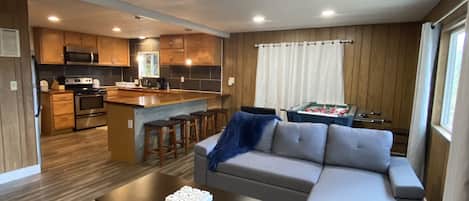
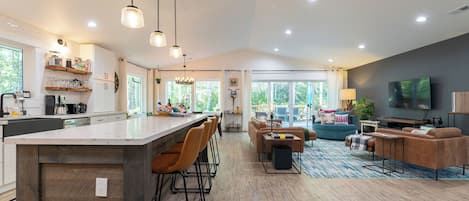
Fully stocked kitchen with coffee machine, microwave, toaster, compact oven, and all utensils.
Living room: Cozy two-seater and three-seater couch, fireplace, and Smart TV with Roku.
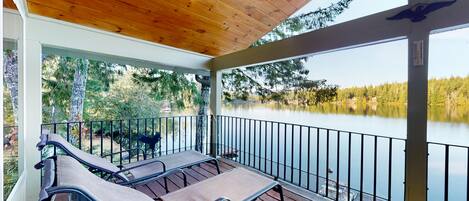
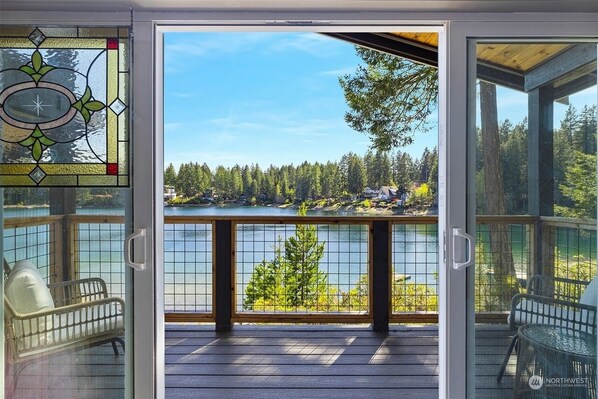
Step onto the large deck with a dining table, outdoor couches, and breathtaking lake views.
Outdoor Amenities:
BBQ grill & firepit near the beach for cozy nights under the stars.
Water activities: 2 kayaks, 2 paddle boats, and 1 peddle boat available. You could borrow owner's Life jackets if needed; bring water shoes for added comfort.
Parking & Community Rules:
Parking for three vehicles (follow signs for Parking 1 & 2). Shared driveway—do NOT block neighbors' path.
Quiet hours: 10 PM–12 AM (no outdoor gatherings after midnight).
Family-friendly playground with swings for kids.
⚠ Policies & Important Info:
No visitors or additional guests due to parking & septic limitations.
Security cameras: Driveway & deck-facing camera for safety.
Burn bans: Seasonal burnbans may be in effect, restricting outdoor fires. Please note that we do not offer compensation for regional burn bans or road closures.
House manual
TV & Entertainment
The living room TV is connected to ROKU with surround sound for an enhanced viewing experience.
How to Use:
Turn On: Use the ROKU remote to power on the TV.
Set Stay Duration: Follow the on-screen prompt to enter the number of nights for automatic sign-out.
Streaming: Log in to Netflix, Amazon Prime, and other apps using your own accounts.
Automatic Sign-Out: Your login details will be automatically deleted after checkout for security.
Troubleshooting
If the living room TV doesn't automatically show the Roku screen after turning it on, follow these steps:
1. Check Input Source: Make sure the TV's input source is set to Soundbar-Q950T.
2. No Input Source Message: If you still see "no input source," go to the input mode setup.
3. Select ARCnet Mode: While on Soundbar-Q950T, press the up arrow and select ARCnet mode.
This should resolve the issue! If you continue to have trouble, feel free to contact us.
Enjoy your favorite shows and movies!
Bedroom TV Instructions
1. Turn On: Use the TV remote to power on the TV.
2. Select Input Source: Go to Input Source and choose ROKU.
3. Switch On Roku: Turn on the ROKU system.
4. Set Checkout Date: Select your checkout date to ensure your login details are automatically deleted.
Cielo Breez Max Quick Guide - Thermostat A/C
On-Device Controls
Temp: ▲ / ▼
Mode: Menu ×1 → ▲ / ▼ (Cool/Heat etc.)
Fan Speed: Menu ×2 → ▲ / ▼
Swing: Menu ×3 → ▲ / ▼
Multiple Settings: Menu → Mode → Fan → Swing
Preset: Tap preset icon
Lock/Unlock Display: Hold ▲ + ▼
Reset Wi-Fi: Hold ▲ + Power
For any issues, refer to the quick guide provided or contact us.
Gas BBQ Outdoor Grill
Enjoy our outdoor gas BBQ grill for your cooking needs!
Instructions:
Turn On: Open the gas tank valve, turn the burner knob, and press the ignition.
Adjust Heat: Use the knobs to control the flame.
Turn Off: Turn off the burner knobs first, then close the gas tank valve.
Cleanup: Please clean the grill after use.
Placement: Feel free to drag it onto the deck, but do not place it next to the wooden fence/walls to avoid fire hazards. Please return it to its original place after use.
For any issues, contact us. Happy grilling!
Life Jackets
For added safety, feel free to borrow the owner’s life jackets during your stay.
Available in various adult sizes and a few child-sized jackets.
Please return them to their designated place after use.
Shared 24 - 48 hours before check-in
Additional rules
The router can be power cycled if the internet is slow or not working. However, factory resetting or tampering with the safety seal of the router will result in a $500 fine.
Air Conditioning Policy: Thermostat must be set no lower than 68°F and no higher than 76°F at all times.
Doors and windows must remain closed while the AC is running.
Thermostats must not be unplugged, reset, or tampered with under any circumstances.
Turn off the AC whenever you leave the house.
Failure to follow these rules may result in additional charges for excessive energy usage or system damage
We appreciate your understanding and look forward to hosting you!

Relax and unwind in our bright, modern home, designed for comfort and serenity.
🛏 Bedrooms & Bathrooms:
Primary Suite (Second Floor): King-sized memory foam bed, foldable queen futon, en-suite bathroom with jacuzzi tub, double vanity, stand-up shower, and deck access for stunning lake views. Closet for storage.
Main Floor:
Bedroom 1: Queen bed with lake views.
Bedroom 2: Bunk bed + twin bed (perfect for kids & families).
Full bathroom with tub & shower.
🍽 Kitchen & Living Spaces:
Fully stocked kitchen with coffee machine, microwave, toaster, compact oven, and all utensils.
Living room: Cozy two-seater and three-seater couch, fireplace, and Smart TV with Roku.
Step onto the large deck with a dining table, outdoor couches, and breathtaking lake views.
Outdoor Amenities:
BBQ grill & firepit near the beach for cozy nights under the stars.
Water activities: 2 kayaks, 2 paddle boats, and 1 peddle boat available. You could borrow owner's Life jackets if needed; bring water shoes for added comfort.
Parking & Community Rules:
Parking for three vehicles (follow signs for Parking 1 & 2). Shared driveway—do NOT block neighbors' path.
Quiet hours: 10 PM–12 AM (no outdoor gatherings after midnight).
Family-friendly playground with swings for kids.
⚠ Policies & Important Info:
No visitors or additional guests due to parking & septic limitations.
Security cameras: Driveway & deck-facing camera for safety.
Burn bans: Seasonal burnbans may be in effect, restricting outdoor fires. Please note that we do not offer compensation for regional burn bans or road closures.
House manual
TV & Entertainment
The living room TV is connected to ROKU with surround sound for an enhanced viewing experience.
How to Use:
Turn On: Use the ROKU remote to power on the TV.
Set Stay Duration: Follow the on-screen prompt to enter the number of nights for automatic sign-out.
Streaming: Log in to Netflix, Amazon Prime, and other apps using your own accounts.
Automatic Sign-Out: Your login details will be automatically deleted after checkout for security.
Troubleshooting
If the living room TV doesn't automatically show the Roku screen after turning it on, follow these steps:
1. Check Input Source: Make sure the TV's input source is set to Soundbar-Q950T.
2. No Input Source Message: If you still see "no input source," go to the input mode setup.
3. Select ARCnet Mode: While on Soundbar-Q950T, press the up arrow and select ARCnet mode.
This should resolve the issue! If you continue to have trouble, feel free to contact us.
Enjoy your favorite shows and movies!
Bedroom TV Instructions
1. Turn On: Use the TV remote to power on the TV.
2. Select Input Source: Go to Input Source and choose ROKU.
3. Switch On Roku: Turn on the ROKU system.
4. Set Checkout Date: Select your checkout date to ensure your login details are automatically deleted.
Cielo Breez Max Quick Guide - Thermostat A/C
On-Device Controls
Temp: ▲ / ▼
Mode: Menu ×1 → ▲ / ▼ (Cool/Heat etc.)
Fan Speed: Menu ×2 → ▲ / ▼
Swing: Menu ×3 → ▲ / ▼
Multiple Settings: Menu → Mode → Fan → Swing
Preset: Tap preset icon
Lock/Unlock Display: Hold ▲ + ▼
Reset Wi-Fi: Hold ▲ + Power
For any issues, refer to the quick guide provided or contact us.
Gas BBQ Outdoor Grill
Enjoy our outdoor gas BBQ grill for your cooking needs!
Instructions:
Turn On: Open the gas tank valve, turn the burner knob, and press the ignition.
Adjust Heat: Use the knobs to control the flame.
Turn Off: Turn off the burner knobs first, then close the gas tank valve.
Cleanup: Please clean the grill after use.
Placement: Feel free to drag it onto the deck, but do not place it next to the wooden fence/walls to avoid fire hazards. Please return it to its original place after use.
For any issues, contact us. Happy grilling!
Life Jackets
For added safety, feel free to borrow the owner’s life jackets during your stay.
Available in various adult sizes and a few child-sized jackets.
Please return them to their designated place after use.
Shared 24 - 48 hours before check-in
Additional rules
The router can be power cycled if the internet is slow or not working. However, factory resetting or tampering with the safety seal of the router will result in a $500 fine.
Air Conditioning Policy: Thermostat must be set no lower than 68°F and no higher than 76°F at all times.
Doors and windows must remain closed while the AC is running.
Thermostats must not be unplugged, reset, or tampered with under any circumstances.
Turn off the AC whenever you leave the house.
Failure to follow these rules may result in additional charges for excessive energy usage or system damage
We appreciate your understanding and look forward to hosting you!
住宿設施服務
海灘
- 沙灘巾
- 沙灘椅
網絡
- 度假屋提供:Wi-Fi
泊車及交通
- 店內設有車位
廚房
- 多士爐
- 咖啡機/沖茶器
- 抹手紙
- 洗碗機
- 焗爐
- 雪櫃
- 煮食用品、餐具和器皿
- 微波爐
- 電熱水煲
- 龍蝦/蟹鍋
- 爐具
- 攪拌機
餐飲
- 餐桌
睡房
- 3 間睡房
- 提供床單
浴室
- 2 個浴室
- 肥皂